
A Rotary Display as My Home Assistant Knob: Elecrow CrowPanel 2.1" ESP32 rotary display
2 min read
Written by

Amrut Prabhu
@smarthomecircleFeatured Video
Table of Contents
Ever had that moment at night where you want to tweak the lights or turn the volume down, but you don’t want to wake anyone up by talking to a voice assistant?
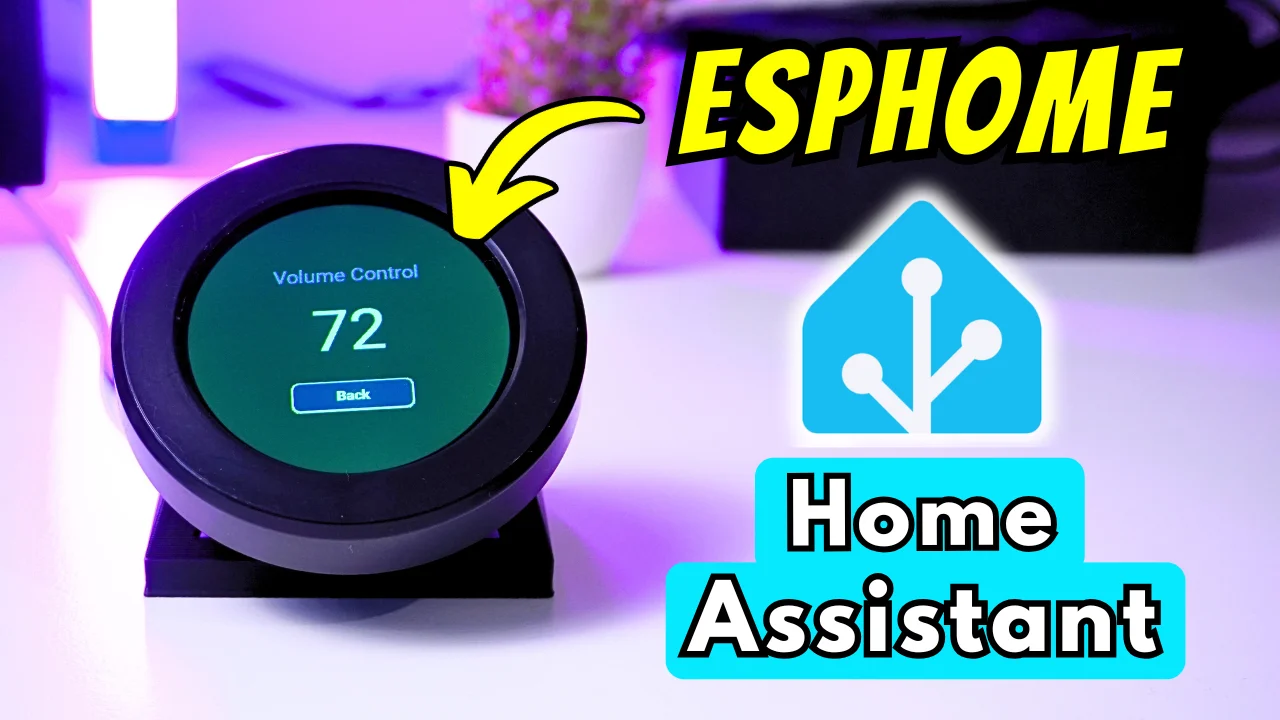
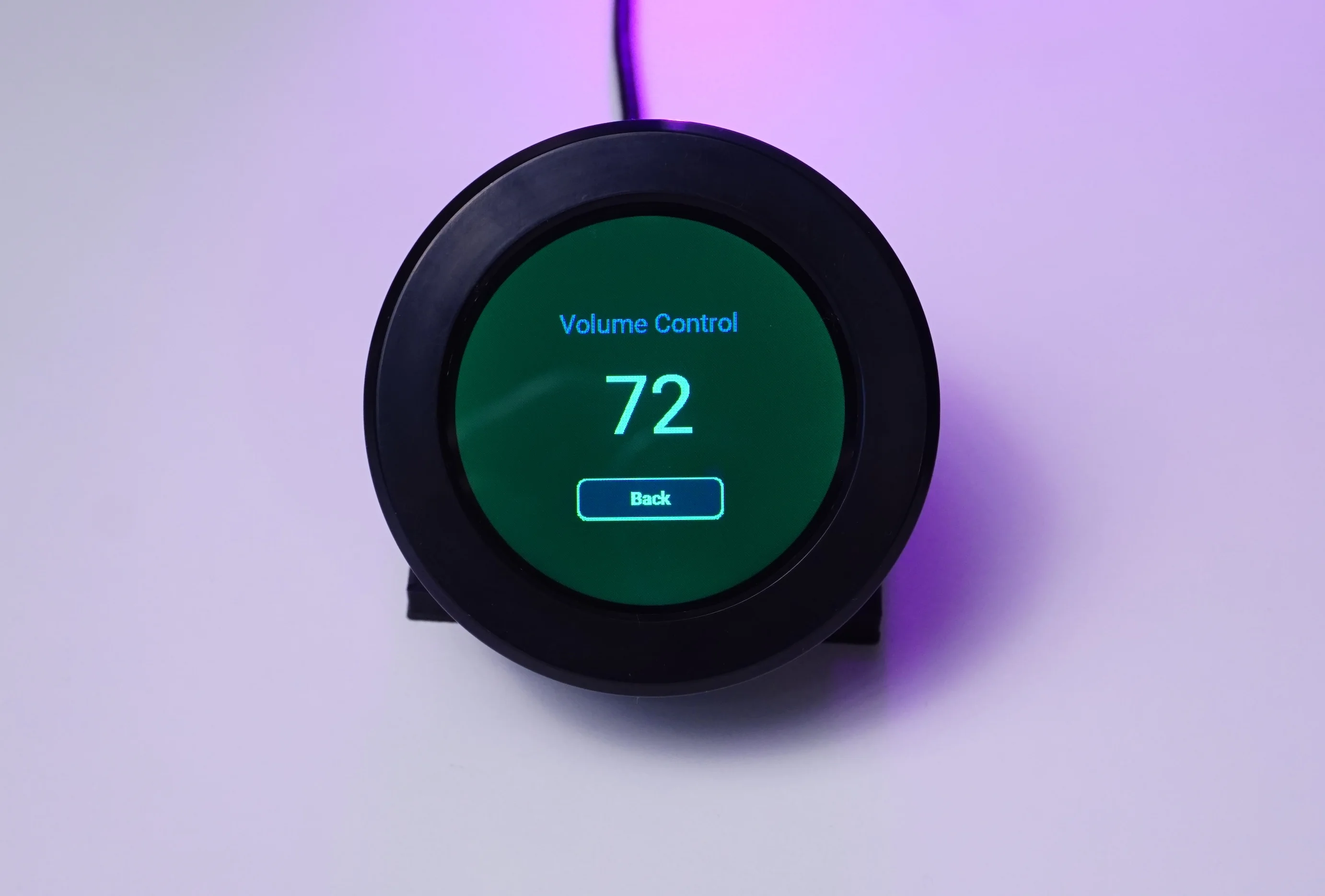
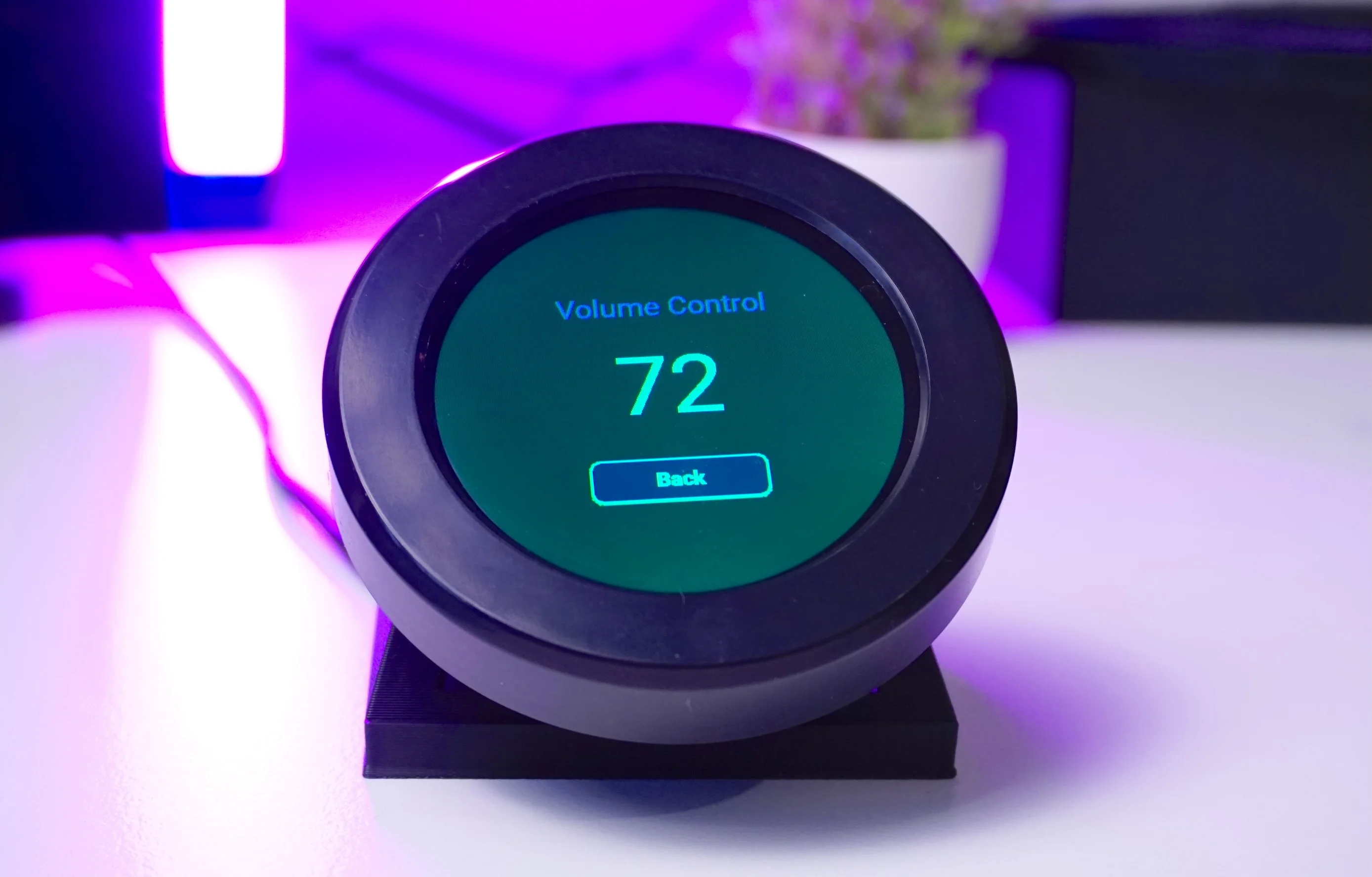
That’s exactly where this little gadget fits into my life: the Elecrow CrowPanel 2.1" ESP32 rotary display – a 2.1" circular IPS touch screen (480×480) with a clickable rotary knob, powered by an ESP32-S3 with 16 MB flash and 8 MB PSRAM.
Buy CrowPanel 2.1 inch ESP32 Rotary Display:
Technical Specification
| Parameter | Specification |
|---|---|
| Main chip | ESP32-S3R8 |
| PSRAM | 8 MB PSRAM |
| Flash storage | 16 MB flash |
| Display size | 2.1" circular |
| Display type | IPS RGB panel |
| Resolution | 480 × 480 pixels |
| Touch | Capacitive touch |
| Wireless | 2.4 GHz Wi-Fi (802.11 a/b/g/n) and Bluetooth Low Energy / Bluetooth 5.0 |
| UART interfaces | 1 × UART0, 1 × UART1 (ZX-MX 1.25–4P) |
| I²C interface | ZX-MX 1.25–4P |
| Buttons | RESET button, BOOT button, confirmation button (knob press switch) |
| LEDs | Power indicator LED, ambient light LED |
| Power input | 5 V / 1 A (DC) |
| Module supply | Module: 5 V DC; main chip: 3.3 V |
| Dimensions | 79 × 79 × 30 mm |
| Enclosure | Aluminum alloy + plastic + acrylic |
| Net weight | 80 g |
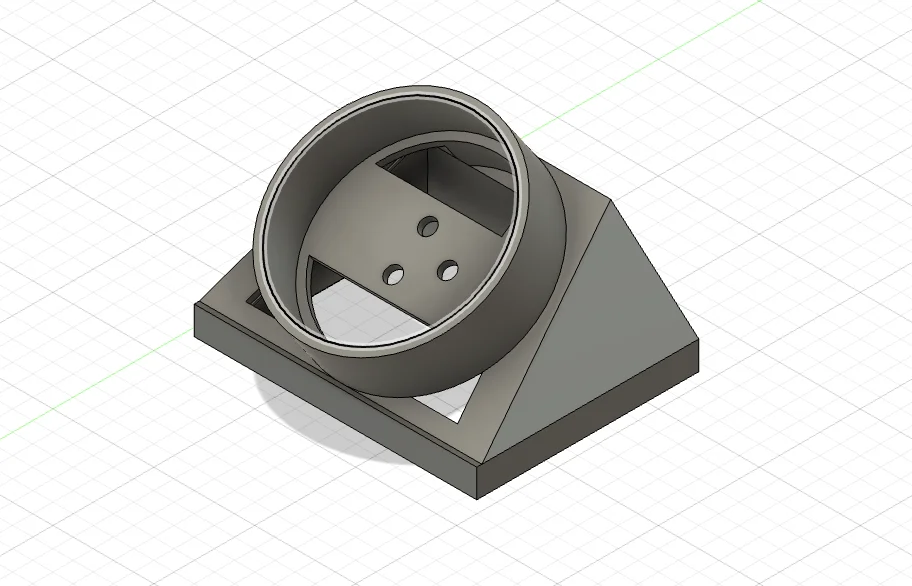
3D Print Files

ESPHome Configuration
Here is is the full ESPHome Configuration that you can copy and paste in your ESPHome device.
It is based on an initial configuration from here
esphome:
  name: elecrow-rotary-display
  friendly_name: Elecrow-Rotary-Display
  platformio_options:
    build_flags: "-DBOARD_HAS_PSRAM"
    board_build.esp-idf.memory_type: qio_opi
    board_build.flash_mode: dio
  on_boot:
    priority: 800
    then:
      - output.turn_on: lcd_power
      - output.turn_on: display_reset
      - delay: 100ms
      - output.turn_off: display_reset
      - delay: 100ms
      - output.turn_on: tp_reset
      - delay: 100ms
      - output.turn_off: tp_reset
      - delay: 120ms
      - output.turn_on: tp_reset
      - delay: 120ms
      - script.execute: screen_idle_timer

esp32:
  board: esp32-s3-devkitc-1
  framework:
    type: esp-idf
    sdkconfig_options:
      CONFIG_ESP32S3_DEFAULT_CPU_FREQ_240: y
      CONFIG_ESP32S3_DATA_CACHE_64KB: y
      CONFIG_SPIRAM_FETCH_INSTRUCTIONS: y
      CONFIG_SPIRAM_RODATA: y

psram:
  mode: octal
  speed: 80MHz


logger:
  level: DEBUG

api:
  encryption:
    key: "DoN9vtxzysgFGhQ9SClSKymNyW+8yz7ljJ9U7A0f1Q0="

ota:
  - platform: esphome
    password: ""

wifi:
  ssid: !secret wifi_ssid
  password: !secret wifi_password


  ap:
    ssid: "Elecrow-rotary"
    password: "EY6rURyzt6WQ"

captive_portal:


i2c:
  sda: 38
  scl: 39
  id: bus_a
  scan: true

touchscreen:
  - platform: cst816
    id: my_touchscreen
    i2c_id: bus_a
    address: 0x15
    update_interval: 50ms
    skip_probe: true
    transform:
      swap_xy: false
      mirror_x: false
      mirror_y: false
    on_touch:
      then:
        - script.execute: screen_idle_timer

pcf8574:
  - id: pcf
    address: 0x21

# Map PCF8574 pins:
# P0: Touch reset (output)
# P2: Touch interrupt (input) – unused
# P3: LCD power (output)
# P4: LCD reset (output)
# P5: Encoder button (input pull-up)
output:
  - platform: ledc
    pin: 6
    id: bl_pwm
    frequency: 19531Hz

  - platform: gpio
    id: lcd_power
    pin:
      pcf8574: pcf
      number: 3
      mode:
        output: true
      inverted: false

  - platform: gpio
    id: tp_reset
    pin:
      pcf8574: pcf
      number: 0
      mode:
        output: true

  - platform: gpio
    id: display_reset
    pin:
      pcf8574: pcf
      number: 4
      mode:
        output: true
      inverted: true


spi:
  clk_pin: 2
  mosi_pin: 1

display:
  - platform: mipi_rgb
    id: rgb_panel

    update_interval: never
    auto_clear_enabled: false

    spi_mode: MODE3
    model: Custom
    color_order: rgb
    invert_colors: false
    # Panel must run in RGB666 (0x3A=0x66) with MDT set, like Elecrow's factory firmware.
    # In 16bit mode black renders as green on this board.
    pixel_mode: 18bit

    dimensions:
      width: 480
      height: 480

    cs_pin: 16
    de_pin: 40
    hsync_pin: 15
    vsync_pin: 7
    pclk_pin: 41
    data_pins:
      red: [46, 3, 8, 18, 17]
      green: [14, 13, 12, 11, 10, 9]
      blue: [5, 45, 48, 47, 21]

    hsync_front_porch: 20
    hsync_pulse_width: 10
    hsync_back_porch: 10
    vsync_front_porch: 8
    vsync_pulse_width: 10
    vsync_back_porch: 10

    show_test_card: false

    pclk_frequency: 18MHz
    pclk_inverted: true

    # ST7701 init sequence (Elecrow st7701_type5_init_operations)
    init_sequence:
      - [0x01]
      - delay 120ms
      - [0xFF, 0x77, 0x01, 0x00, 0x00, 0x10]

      - [0xC0, 0x3B, 0x00]
      - [0xC1, 0x0B, 0x02]
      - [0xC2, 0x00, 0x02]

      - [0xCC, 0x10]
      - [0xCD, 0x08]

      - [0xB0, 0x02, 0x13, 0x1B, 0x0D, 0x10, 0x05, 0x08, 0x07, 0x07, 0x24, 0x04, 0x11, 0x0E, 0x2C, 0x33, 0x1D]
      - [0xB1, 0x05, 0x13, 0x1B, 0x0D, 0x11, 0x05, 0x08, 0x07, 0x07, 0x24, 0x04, 0x11, 0x0E, 0x2C, 0x33, 0x1D]

      - [0xFF, 0x77, 0x01, 0x00, 0x00, 0x11]

      - [0xB0, 0x5D]
      - [0xB1, 0x43]
      - [0xB2, 0x81]
      - [0xB3, 0x80]

      - [0xB5, 0x43]

      - [0xB7, 0x85]
      - [0xB8, 0x20]

      - [0xC1, 0x78]
      - [0xC2, 0x78]

      - [0xD0, 0x88]

      - [0xE0, 0x00, 0x00, 0x02]

      - [0xE1, 0x03, 0xA0, 0x00, 0x00, 0x04, 0xA0, 0x00, 0x00, 0x00, 0x20, 0x20]

      - [0xE2, 0x00, 0x00, 0x00, 0x00, 0x00, 0x00, 0x00, 0x00, 0x00, 0x00, 0x00, 0x00, 0x00]

      - [0xE3, 0x00, 0x00, 0x11, 0x00]

      - [0xE4, 0x22, 0x00]

      - [0xE5, 0x05, 0xEC, 0xA0, 0xA0, 0x07, 0xEE, 0xA0, 0xA0, 0x00, 0x00, 0x00, 0x00, 0x00, 0x00, 0x00, 0x00]

      - [0xE6, 0x00, 0x00, 0x11, 0x00]

      - [0xE7, 0x22, 0x00]

      - [0xE8, 0x06, 0xED, 0xA0, 0xA0, 0x08, 0xEF, 0xA0, 0xA0, 0x00, 0x00, 0x00, 0x00, 0x00, 0x00, 0x00, 0x00]

      - [0xEB, 0x00, 0x00, 0x40, 0x40, 0x00, 0x00, 0x00]

      - [0xED, 0xFF, 0xFF, 0xFF, 0xBA, 0x0A, 0xBF, 0x45, 0xFF, 0xFF, 0x54, 0xFB, 0xA0, 0xAB, 0xFF, 0xFF, 0xFF]

      - [0xEF, 0x10, 0x0D, 0x04, 0x08, 0x3F, 0x1F]

      - [0xFF, 0x77, 0x01, 0x00, 0x00, 0x13]
      - [0xEF, 0x08]

      - [0xFF, 0x77, 0x01, 0x00, 0x00, 0x00]

font:
  - file:
      type: gfonts
      family: Montserrat
      weight: 700
    id: montserrat_22_bold
    size: 22
    bpp: 4
  - file:
      type: gfonts
      family: Montserrat
    id: montserrat_100
    size: 100
    bpp: 4

light:
  - platform: monochromatic
    id: lcd_backlight
    name: "LCD Backlight"
    output: bl_pwm
    default_transition_length: 0s
    restore_mode: ALWAYS_ON

globals:
  - id: current_page
    type: int
    initial_value: '0'
  - id: volume_value
    type: int
    initial_value: '50'
  - id: brightness_value
    type: int
    initial_value: '50'


sensor:
  # Media player volume (0.0–1.0 → 0–100)
  - platform: homeassistant
    id: ha_media_volume
    entity_id: media_player.esp32_s3_wake_word_media_player_2
    attribute: volume_level
    internal: true
    on_value:
      - lambda: |-
          if (!isnan(x)) {
            id(volume_value) = int(x * 100.0f + 0.5f);
          }
      - lvgl.label.update:
          id: volume_display
          text: !lambda |-
            static char buf[8];
            snprintf(buf, sizeof(buf), "%d", id(volume_value));
            return buf;

  # Night light brightness (0–255 → 0–100)
  - platform: homeassistant
    id: ha_light_brightness
    entity_id: light.smart_night_light_w
    attribute: brightness
    internal: true
    on_value:
      - lambda: |-
          if (!isnan(x)) {
            int pct = int((x / 255.0f) * 100.0f + 0.5f);
            id(brightness_value) = pct;
          }

      - lvgl.label.update:
          id: brightness_value_label
          text: !lambda |-
            static char buf[16];
            snprintf(buf, sizeof(buf), "%d%%", id(brightness_value));
            return buf;

  # Rotary encoder: brightness on page 1, volume on page 2
  - platform: rotary_encoder
    id: knob
    name: "Encoder"
    pin_a:
      number: 42
      mode:
        input: true
        pullup: true
    pin_b:
      number: 4
      mode:
        input: true
        pullup: true
    resolution: 2
    min_value: -100
    max_value:  100

    # When turned clockwise
    on_clockwise:
      then:
        - script.execute: screen_idle_timer

        # Brightness page → decrease on clockwise
        - if:
            condition:
              lambda: 'return id(current_page) == 1;'
            then:
              - lambda: |-
                  int step = 5;
                  int new_brightness = id(brightness_value) - step;
                  if (new_brightness < 0) new_brightness = 0;
                  id(brightness_value) = new_brightness;
              - lvgl.label.update: # updates the label with the new brightness level
                  id: brightness_value_label
                  text: !lambda |-
                    static char buf[16];
                    snprintf(buf, sizeof(buf), "%d%%", id(brightness_value));
                    return buf;
              - homeassistant.action:
                  action: light.turn_on
                  data:
                    entity_id: light.smart_night_light_w
                  data_template:
                    brightness_pct: !lambda 'return (float) id(brightness_value);'

        # Volume page → decrease on clockwise
        - if:
            condition:
              lambda: 'return id(current_page) == 2;'
            then:
              - lambda: |-
                  int step = 2;
                  int new_vol = id(volume_value) - step;
                  if (new_vol < 0) new_vol = 0;
                  id(volume_value) = new_vol;
              - lvgl.label.update:
                  id: volume_display
                  text: !lambda |-
                    static char buf[8];
                    snprintf(buf, sizeof(buf), "%d", id(volume_value));
                    return buf;
              - homeassistant.action:
                  action: media_player.volume_set
                  data:
                    entity_id: media_player.esp32_s3_wake_word_media_player_2
                  data_template:
                    volume_level: !lambda 'return id(volume_value) / 100.0;'

    # When turned anticlockwise
    on_anticlockwise:
      then:
        - script.execute: screen_idle_timer

        # Brightness page → increase on anticlockwise
        - if:
            condition:
              lambda: 'return id(current_page) == 1;'
            then:
              - lambda: |-
                  int step = 5;
                  int new_brightness = id(brightness_value) + step;
                  if (new_brightness > 100) new_brightness = 100;
                  id(brightness_value) = new_brightness;
              - lvgl.label.update:
                  id: brightness_value_label
                  text: !lambda |-
                    static char buf[16];
                    snprintf(buf, sizeof(buf), "%d%%", id(brightness_value));
                    return buf;
              - homeassistant.action:
                  action: light.turn_on
                  data:
                    entity_id: light.smart_night_light_w
                  data_template:
                    brightness_pct: !lambda 'return (float) id(brightness_value);'

        # Volume page → increase on anticlockwise
        - if:
            condition:
              lambda: 'return id(current_page) == 2;'
            then:
              - lambda: |-
                  int step = 2;
                  int new_vol = id(volume_value) + step;
                  if (new_vol > 100) new_vol = 100;
                  id(volume_value) = new_vol;
              - lvgl.label.update:
                  id: volume_display
                  text: !lambda |-
                    static char buf[8];
                    snprintf(buf, sizeof(buf), "%d", id(volume_value));
                    return buf;
              - homeassistant.action:
                  action: media_player.volume_set
                  data:
                    entity_id: media_player.esp32_s3_wake_word_media_player_2
                  data_template:
                    volume_level: !lambda 'return id(volume_value) / 100.0;'

binary_sensor:
  # 1) Status: ON when connected to Home Assistant API
  - platform: status
    id: ha_status
    on_press:
      - logger.log: "HA status ON → showing main menu"
      - lvgl.page.show: main_menu_page
      - lambda: 'id(current_page) = 0;'
    on_release:
      - logger.log: "HA status OFF → showing connecting page"
      - lvgl.page.show: connecting_page
      - lambda: 'id(current_page) = -1;'

  # 2) Encoder button: just wake screen / keep alive
  - platform: gpio
    id: encoder_button
    name: "Encoder Button"
    pin:
      pcf8574: pcf
      number: 5
      mode:
        input: true
      inverted: true   # pressed = ON (low)
    on_press:
      - script.execute: screen_idle_timer

script:
  - id: screen_idle_timer
    mode: restart
    then:
      - light.turn_on: lcd_backlight
      - delay: 20sec   #screen on time. turn off screen after 20 seconds
      - logger.log: "No activity → turning screen OFF"
      - light.turn_off: lcd_backlight


# LVGL configuration
lvgl:
  displays:
    - rgb_panel

  touchscreens:
    - my_touchscreen

  encoders:
    - sensor: knob
      enter_button: encoder_button
      group: menu_group

  default_font: montserrat_16

  # Global background: dark, low-glare navy
  disp_bg_color: 0x006f4d
  bg_color: 0x006f4d
  scroll_on_focus: false

  theme:
    button:
      # Default (not selected)
      bg_color: 0xD9EFE5
      text_color: 0x073C2A
      border_width: 1
      border_color: 0x073C2A
      radius: 12

      # Focused / selected
      focused:
        bg_color: 0xFFD166
        text_color: 0x073C2A
        border_width: 3
        border_color: 0xFFFFFF

      # Pressed
      pressed:
        bg_color: 0x70C79B
        text_color: 0x073C2A
        border_width: 2
        border_color: 0x236B4A

  pages:
    # Connecting Page (shown while HA is not connected)
    - id: connecting_page
      skip: false
      scrollable: false
      on_load:
        - lambda: |-
            id(current_page) = -1;
      widgets:
        - label:
            text: "Connecting to Home Assistant..."
            x: 0
            y: -10
            align: CENTER
            text_font: montserrat_20
            text_color: 0xE5E7EB

        - label:
            text: "Please wait"
            x: 0
            y: 30
            align: CENTER
            text_font: montserrat_16
            text_color: 0x9CA3AF

    # Main Menu Page
    - id: main_menu_page
      skip: false
      scrollable: false
      on_load:
        - lambda: |-
            id(current_page) = 0;
      widgets:
        - button:
            id: temp_menu_btn
            x: 100
            y: 180
            width: 300
            height: 60
            group: menu_group
            clickable: true
            on_press:
              - lvgl.page.show: brightness_page
            widgets:
              - label:
                  text: "Brightness"
                  text_font: montserrat_22_bold
                  align: CENTER

        - button:
            id: volumes_menu_btn
            x: 100
            y: 260
            width: 300
            height: 60
            group: menu_group
            clickable: true
            on_press:
              - lvgl.page.show: volume_page
            widgets:
              - label:
                  text: "Volume"
                  text_font: montserrat_22_bold
                  align: CENTER

    # Brightness Page
    - id: brightness_page
      skip: true
      scrollable: false
      on_load:
        - lambda: |-
            id(current_page) = 1;
        - lvgl.label.update:
            id: brightness_value_label
            text: !lambda |-
              static char buf[16];
              snprintf(buf, sizeof(buf), "%d%%", id(brightness_value));
              return buf;
      widgets:
        - label:
            id: temp_title
            text: "Night Light"
            x: 0
            y: -100
            align: CENTER
            text_font: montserrat_32
            text_color: 0xE5E7EB

        - label:
            id: brightness_value_label
            text: "--%"
            x: 0
            y: 0
            align: CENTER
            text_font: montserrat_100
            text_color: 0x38BDF8

        - button:
            id: brightness_back_btn
            x: 150
            y: 330
            width: 180
            height: 50
            clickable: true
            on_press:
              - lvgl.page.show: main_menu_page
              - lambda: 'id(current_page) = 0;'
            widgets:
              - label:
                  text: "Back"
                  align: CENTER
                  text_font: montserrat_22_bold

    # Volume Page
    - id: volume_page
      skip: true
      scrollable: false
      on_load:
        - lambda: |-
            id(current_page) = 2;
        - lvgl.label.update:
            id: volume_display
            text: !lambda |-
              static char buf[8];
              snprintf(buf, sizeof(buf), "%d", id(volume_value));
              return buf;
      widgets:
        - label:
            id: volumes_title
            text: "Volume Control"
            x: 0
            y: -100
            align: CENTER
            text_font: montserrat_32
            text_color: 0xE5E7EB

        - label:
            id: volume_display
            text: ""
            x: 0
            y: 0
            align: CENTER
            text_font: montserrat_100
            text_color: 0x38BDF8

        - button:
            id: volume_back_btn
            x: 150
            y: 330
            width: 180
            height: 50
            clickable: true
            on_press:
              - lvgl.page.show: main_menu_page
              - lambda: 'id(current_page) = 0;'
            widgets:
              - label:
                  text: "Back"
                  align: CENTER
                  text_font: montserrat_22_bold